
Offline-first, P2P & ultra-fast runtime for modern C++
Build HTTP & WebSocket backends that stay reliable on unstable networks — with script mode, dev hot-reload, packaging and a runtime designed for real-world latency.
~$ vix run server.cpp
4:13:13 PM  ● VIX   READY   Vix.cpp v1.16.2 (1 ms)   run
› HTTP:   http://localhost:8080/
› WS:     ws://localhost:9090/
i Threads: 4/8
i Mode:    run
i Status:  ready
i Hint:    Ctrl+C to stop the server
What is Vix.cpp Runtime ?
Vix.cpp is not just another backend framework it is a modular C++ runtime designed for distributed applications, edge systems, offline devices and unstable, low-quality networks.
Built for unstable networks
Most runtimes assume stable connectivity. Vix.cpp is engineered to keep working when latency spikes, packets drop and connectivity is intermittent.
Offline-first by design
The goal is to let applications continue running and providing value even when the cloud is not reachable sync when you can, work when you can’t.
Peer-to-peer ready
Vix.cpp is evolving towards a P2P-friendly model where nodes can communicate, sync state and coordinate locally without a central server.
Modern C++ runtime
Rebuilt from scratch in C++20, inspired by FastAPI, Vue.js, React and modern runtimes like Node, Deno and Bun but with native speed and full control.
How it works
A simple workflow: start fast in script mode, iterate in dev mode, then package and verify for distribution.
1) Write your app
Build an HTTP or WebSocket backend with modern C++ — simple routes, typed WS messages, predictable threading.
2) Run or Dev
Use vix run file.cpp for one-shot execution, or
vix dev file.cpp for hot-reload while you iterate.
3) Pack & verify
Distribute safely with vix pack and
vix verify. Then install with
vix install.
Benchmarks — Vix.cpp vs other runtimes
Benchmarks are run with wrk using 8 threads, 800
connections and 30 seconds, on the same machine (Ubuntu 24.04, Intel
Xeon, C++20 release build, logging disabled).
| Framework | Requests/sec | Avg latency |
|---|---|---|
| ⭐ Vix.cpp (v1.12.1, pinned CPU) | ~98,942 | 7.3–10.8 ms |
| Vix.cpp (default run) | 81,300–81,400 | 9.7–10.8 ms |
| Go (Fiber) | 81,336 | 0.67 ms |
| Deno | ~48,868 | 16.34 ms |
| Node.js (Fastify) | 4,220 | 16.00 ms |
| PHP (Slim) | 2,804 | 16.87 ms |
| Crow (C++) | 1,149 | 41.60 ms |
| FastAPI (Python) | 752 | 63.71 ms |
When pinned to a single core (taskset -c 2), Vix.cpp
reaches ~99k req/s, matching or surpassing high performance C++
microframeworks.
Why Vix.cpp exists
Most backend frameworks assume stable networks, low latency and always-on cloud access. In real-world conditions (Africa, campuses, field teams, rural areas), connectivity drops — but work must continue.
Offline-first reality
Apps shouldn’t stop because the network stopped. Vix.cpp keeps systems usable during outages, then syncs when connectivity comes back.
Unstable networks & real latency
High jitter, packet loss and slow links are normal. Vix.cpp is built for predictable behavior under degraded network conditions.
Edge & local-first
Push compute closer to users: local clusters, on-prem deployments, and hybrid setups where cloud is just one piece of the system.
Key features → What makes Vix.cpp different
Async HTTP runtime
High-performance asynchronous HTTP server built on Beast/Asio, with predictable threading, low latency and production-ready routing.
WebSocket engine
Typed WebSocket runtime with broadcast, rooms, metrics and seamless integration with the HTTP executor for real-time systems.
Dev mode with hot-reload
vix dev enables file watching, automatic rebuilds
and live reload — a modern development workflow for C++
backends.
Script mode for C++
Run a single .cpp file like a script using
vix run file.cpp, with zero boilerplate and no
manual CMake setup.
Powerful unified CLI
One CLI to rule everything:
new, build, run,
dev, check, tests,
pack and verify.
Packaging & security
Built-in application packaging, signing and verification via
vix pack and vix verify, designed for
secure distribution.
Relational ORM
Native ORM for MySQL and SQLite, designed to integrate naturally with the Vix.cpp runtime and async execution model.
Modular runtime architecture
Core, HTTP, WebSocket, ORM, JSON, CLI, middleware and Rix libraries — each module focused, composable and independently evolvable.
Use cases
Vix.cpp is designed for real-world conditions: unstable networks, edge/local deployments, and real-time systems.
Offline-first systems
Campuses, hospitals, field teams — keep apps usable during outages, sync later when connectivity returns.
Real-time backends
Chat, notifications, presence, dashboards — typed WebSocket runtime with broadcast and room patterns.
Edge & on-prem
Deploy close to users: local clusters, universities, SMEs, and hybrid setups where cloud is optional.
High-performance APIs
Low overhead HTTP runtime and a unified CLI workflow to ship fast, test fast, and run fast.
Architecture — modular runtime
Vix.cpp is organized as focused modules you can compose. Keep the core small, add what you need.
new, build,
run, dev, checks, tests and packaging.
Real-time WebSocket chat, built with Vix.cpp
This is not a mockup it’s a real chat application running on top of the Vix.cpp WebSocket module. Rooms, history, typed messages and activity feed, all powered by the runtime.
-
Rooms
Join any room (like
africa) and start chatting in real time. - History Messages are persisted and re-loaded when you reconnect.
- Events System events such as joins, leaves and connection status are streamed in a dedicated activity panel.
- Runtime All of this runs on the same executor, metrics and thread pool used by the HTTP runtime.
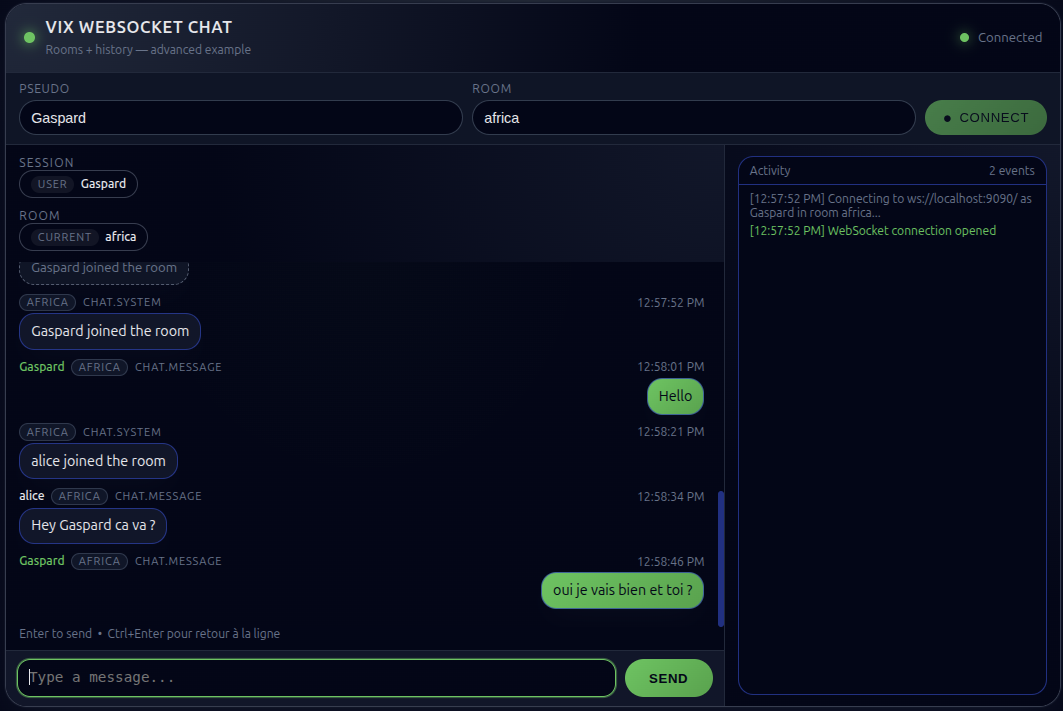
Example: user Gaspard and
alice chatting in room
africa through a Vix.cpp WebSocket server.
Quick example
Two minimal examples: a tiny HTTP server (send()), then
an HTTP + WebSocket server (typed messages + broadcast).
#include <vix.hpp>
using namespace vix;

int main() {
  App app;
  app.get("/", [](Request&, Response& res) {
    res.send("Hello from Vix.cpp 👋");
  });
  app.run(8080);
}#include <vix.hpp>
#include <vix/websocket/AttachedRuntime.hpp>
using namespace vix;
int main() {
vix::serve_http_and_ws([](auto& app, auto& ws) {
app.get("/", [](auto&, auto& res) {
res.send("HTTP + WebSocket ready");
});
ws.on_typed_message(
[&ws](auto&, auto& type, auto& payload) {
ws.broadcast_json(type, payload);
});
});
}
Tip: you can run these directly with vix run file.cpp,
or use vix dev for hot-reload while iterating.
Script mode — run or dev .cpp files directly
Vix.cpp can execute a single .cpp file like a script.
Choose between a simple run or a full development mode with hot
reload — no manual CMake setup, no project boilerplate.
vix run file.cpp
# One-shot execution (compile + run)

vix dev file.cpp
# Development mode (watch + hot reload)
run compiles and executes the file
once. dev starts a development
server with file watching, automatic rebuilds and live reload on
changes.
Under the hood, Vix.cpp generates a temporary CMake project in
.vix-scripts/<filename>/, builds it and runs
the resulting executable.
~$ vix dev server.cpp

  VIX dev  • hot-reload enabled
  ➜ Watching: /home/softadastra/server.cpp
  🏃 Dev server started (pid=22115)

4:20:02 PM  ◆ VIX   READY   Vix.cpp v1.16.2 (1 ms)   dev

› HTTP:   http://localhost:8080/
› WS:     ws://localhost:9090/
i Threads:4/8
i Mode:   dev (watch/reload)
i Status: ready
i Hint:   Ctrl+C to stop the server
CLI at a glance
One CLI for the entire workflow: project creation, dev, build, run, tests, packaging and verification.
vix new api
vix build
vix run
vix devvix check
vix testsvix pack --name blog --version 1.0.0
vix verify --require-signature
vix install --path blog@1.0.0.vixpkgvix run server.cpp
vix dev server.cpp
Tip: vix help <command> shows detailed help for
any command.
Trust & reproducibility
Keep it real: performance numbers should be reproducible, and distribution should be verifiable.
Reproducible benchmarks
Benchmarks use the same machine and settings to compare runtimes fairly (threads, connections, duration, release build).
Signed artifacts
Package and verify apps with vix pack and
vix verify for secure distribution.
Minimal magic
Modern C++20 design, explicit tooling, and a modular architecture — easy to audit and evolve.
Roadmap
Short and honest: here’s what’s next as Vix.cpp evolves into a complete offline-first runtime.
Get started
Quick start (recommended): create a project and launch dev mode:
~$ vix new api
cd api
vix dev
vix dev enables watch + rebuild +
reload (hot-reload) — ideal while building your API.
Prefer building from source? Clone the repo and run an example:
git clone https://github.com/vixcpp/vix.git
cd vix
# Fetch submodules (required)
git submodule update --init --recursive
cmake -S . -B build -DCMAKE_BUILD_TYPE=Release
cmake --build build -j
# Run an example
vix run examples/http_basic.cpp
Run an app once (release-style), or use script mode on a single file:
~$ vix build
vix run

# Or run a single C++ file directly
vix run server.cpp
Discover the CLI commands:
~$ vix -hFor more examples, architecture details and module documentation, check the README and docs inside the repository.